
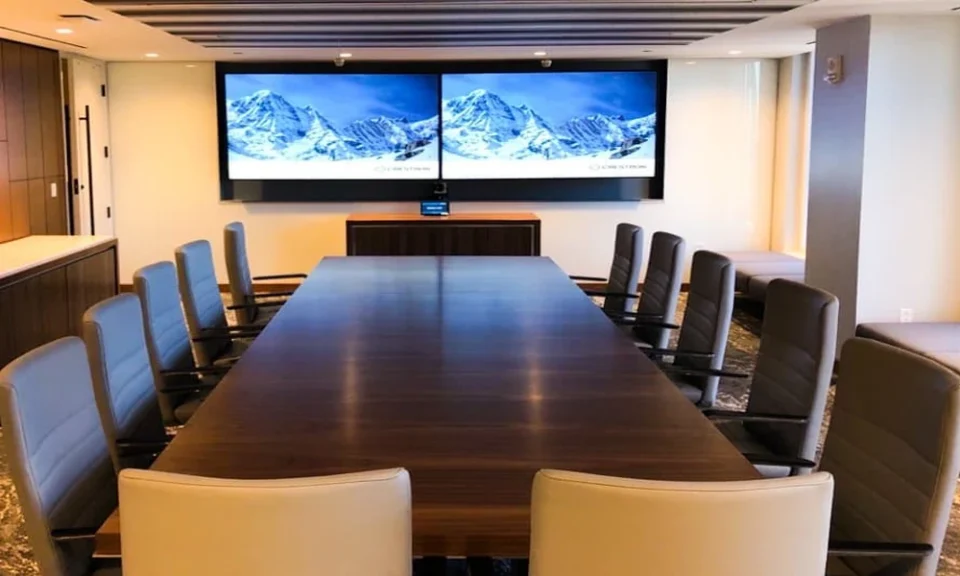
A conference room should help conversations move forward without technical distractions. Clear sound, dependable video, and simple controls create a space where presentations, discussions, and remote participation stay productive. Careful planning before installation also reduces avoidable interruptions during important meetings.
Organizations that work with specialists such as HB Sound and Light sometimes focus on room layout before selecting equipment because every space has different communication needs. Microphone placement, display visibility, and camera angles all affect meeting quality more than equipment specifications alone. A balanced setup allows every participant to hear, see, and contribute with confidence.
Plan The Room Before Equipment Selection
Every conference room has unique dimensions, seating arrangements, and presentation requirements. Equipment should match how the room will actually support daily meetings instead of following a standard package. Proper planning creates a system that remains practical as meeting needs change.
Match The Layout To Meeting Style
Boardroom discussions require different camera coverage than training sessions or client presentations. Display locations should remain visible from every seat without forcing attendees to turn constantly. Cable paths, furniture placement, and power access also deserve attention before installation begins.
Improve Audio Performance First
Poor audio creates confusion even when video quality looks excellent. Clear speech allows participants to stay engaged without repeated interruptions or missed details. Room acoustics also influence microphone performance more than many organizations expect.
Key audio improvements include:
- Position microphones close enough to capture natural speech.
- Place speakers where sound reaches every seating area evenly.
- Reduce echo with suitable room finishes and furniture placement.
- Separate microphones from speakers whenever possible.
- Test audio levels before regular meeting schedules begin.
Create Better Camera And Display Coverage
A camera should capture every participant naturally instead of focusing on only one section of the table. Displays should remain large enough for shared documents, presentations, and remote attendees without reducing readability. Companies that consult with experts like HB Sound and Light frequently prioritize balanced camera placement and display positioning because those choices improve communication throughout the room.
Choose Practical Viewing Angles
Displays mounted too high or too low create unnecessary strain during longer meetings. Camera height should closely match natural eye level to encourage comfortable conversations. Consistent framing also helps remote participants remain connected throughout discussions.
Simplify Daily Meeting Controls
Conference room technology should remain easy for every employee to operate. Complicated startup steps waste valuable meeting time and increase support requests. Straightforward controls encourage consistent use across different departments.
Helpful control features include:
- One-touch meeting startup.
- Wireless presentation sharing.
- Clearly labeled room controls.
- Reliable source switching between connected devices.
- Simple shutdown procedures after each meeting.
Test The Complete System Before Regular Use
Individual components may perform well on their own while still creating issues after full integration. Complete system testing confirms that audio, video, displays, and controls operate together without delays or connection problems. Regular reviews also help identify small adjustments before they affect important presentations.
A dependable conference room depends on thoughtful planning instead of equipment alone. Careful setup decisions create reliable communication, smoother collaboration, and a professional experience for everyone in the room. Consistent testing and practical design choices help conference spaces continue supporting productive meetings for years.
Tips to Choose A Conference Room AV Installation Specialist
Choose a specialist who evaluates room size, seating layout, acoustics, and display placement before recommending equipment. Experience with conference room integration helps create balanced audio, reliable video coverage, and simple system operation. Careful planning also supports long-term performance, easier maintenance, and dependable meeting quality.
A well-designed conference room allows teams and clients to communicate without technical distractions or unnecessary delays. Thoughtful equipment placement, complete system testing, and practical room planning contribute to consistent performance throughout daily use. Reliable audio and video solutions help conference spaces remain productive as workplace communication needs continue to evolve.
